


Description
SPROG drM SPC100 Model Train Speedometer
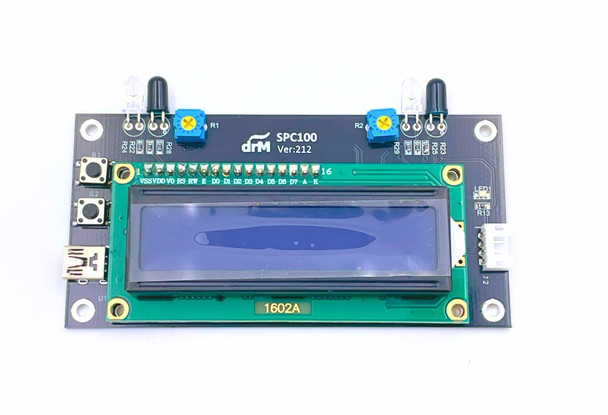
A Trackside Speedometer for G/1/O/HO/OO/S/N/Z scale, supporting multiple countries with differing scale ratios and showing units in Km/h or mph.
Sitting alongside your track, this is the easy way to see the scale speed of your trains.
This unit stands beside any track, and displays the speed of a train as it passes, in either direction.
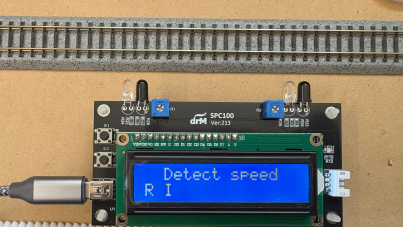
It is a stand-alone device, runs off 5V USB power, and is ideal for DC or DCC layouts.
The speedometer uses the precision of a microcontroller to measure the time between two infrared beams that the train passes through. Based on this time, the scale speed can be calculated from a mathematically derived calibration factor.
Built into the software are the calibration factors for US (1:160) and UK (1:148) N scales, US H0 and British 00, etc. and these factors are selectable from a button accessible from the front panel of the device. The default is US H0.
Speed is displayed for ~3 seconds and then the unit goes into "Detect speed" mode again.
The unit will auto shut off after 10 minutes (selectable) of no trains.
Select the built-in sensors or add on the optional remote sensor unit with ~18" cable which allows you to install sensors closer to your running track and have the display closer to you!.
Our package includes the USB A to mini power cable, suitable for use with any USB power block or adapter.
The unit is 4" x 2" and can sit beside a track, or an optional remote sensor unit can be placed into less accessible locations.
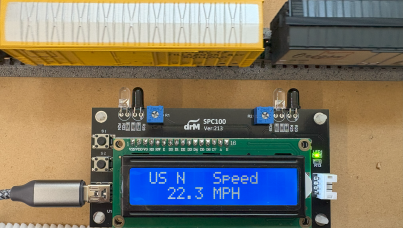
Seen here measuring 22.3 MPH for this N Scale freight train.
See the User Manual for full details about this Speedometer and its features.
See our Application Note for using this Speedometer to help set up speed-matching of locos with SPROG.
We have found that the sensors on the speedometer are very sensitive. If you find difficulty getting reliable speed readings, we suggest that you turn the two adjustable sensitivity settings to minimum, and then adjust to get consistent operation.
Some hints and tips about speed matching
With acknowledgement to Dave Heap for these details and recommendations
The NMRA S9.2.2 specifies that all decoders must provide CV2 (Vstart).
- The provision of CV6 (Vhigh) and CV5 (Vhigh) is optional. These three CVs are to be active only when Bit 4 of CV29 is 0.
- Speed tables are optional and use CVs 66 (Fwd Trim) 67-94 (the actual speed curve) and 95 (Rev Trim).
- These thirty CVs are to be active only when Bit 4 of CV29 is 1.
- The disadvantage of this speed table specification is that any tweaking of starting or maximum speeds requires reshaping of the entire speed curve.
SoundTraxx Tsunami decoders differ from the standard.
- When the speed table is active (Bit 4 of CV29 is 1), the value in CV2 is not ignored but is effectively (in the decoder) added to CVs 67-94 in the speed table, pushing it upwards.
- The advantage of this variation from the NMRA standard is that you can tweak the starting speed without reshaping the whole curve, but the disadvantage is that you can effectively flatten the top end of the speed table it the maximum speed was already high.
QSI decoders differ from the standard.
- When the speed table is active (Bit 4 of CV29 is 1), the values in CVs 2 and 5 are not ignored.
- If either of CVs 2 or 5 are non-zero, these become the actual Vstart and/or Vhigh and the effective values in CVs 67-94 are compressed or expanded (scaled) in the decoder so the actual curve starts and/or ends on any non-zero value in Vstart and/or Vhigh.
- The advantage of this variation from the NMRA standard is that you can tweak both starting and maximum speeds without reshaping the whole curve, but the disadvantage is that if your speed table already covered a restricted range, the curve will be expanded, with possible integer multiplication errors producing glitches in the speed table.
ESU V4 and Select decoders differ from the standard.
- When the speed table is active (Bit 4 of CV29 is 1), the values in CVs 2 and 5 are not ignored, but ALWAYS specify the actual Vstart and Vhigh of the loco.
- In addition the value of CV67 is fixed (read only) at 1 and the value of CV94 is fixed (read only) at 255.
- You therefore need to fit your speed table curve shape between these fixed end points.
- The effective values in CVs 67-94 are compressed (in the decoder) so the actual curve always starts and ends on the values in Vstart and Vhigh.
- The advantage of this variation from the NMRA standard is that you can tweak both starting and maximum speeds without reshaping the whole curve and without the possible multiplicative errors in the QSI approach.
- The LokProgrammer and JMRI DecoderPro software both enforce the restrictions on CVs 67 and 94 so you know what your speed table will actually look like.
- Also, the minimum value for CV2 is 1, so you cannot set the loco to be stationary at step 1.
The important thing to make very clear is that ALL FOUR DIFFERENT APPROACHES ALLOW FULL CONTROL OF SETTING THE ENTIRE SPEED RANGE OF THE LOCO.
There is no limitation on setting of starting or maximum speed. But you MUST be aware of the different ways of setting up different decoders.
The other important point is that THIS DOES NOT PREVENT SPEED MATCHING of different brands, you just have to be aware of the different ways of setting up each brand.
The best way of avoiding problems is with any brand or mix thereof is to match speed steps in this order 1,28,14,7,21,... This will avoid any problems with any brand.
Additional Resources
MANUFACTURERS WEBSITE: |
|
SOUND CONFIGURATION & SOUND FILE RESOURCES: |
|
FIRMWARE & SOFTWARE RESOURCES: |
|
PRODUCT MANUALS & TECHNICAL DOCUMENT RESOURCES: |
|
MANUFACTURERS WARRANTY & REPAIRS: |
|
ADDITIONAL INFORMATION - DCC TIPS: |
|
ADDITIONAL INFORMATION (1): |
|
ADDITIONAL INFORMATION (2): |
Additional Information
PRODUCT CLASS : |
All Scales |
SIZE-INCH (L x W x H): |
0 x 0 x 0 in |
SIZE-METRIC (L x W x H): |
0 x 0 x 0 mm |
ADDITIONAL FEATURES: |
NA |
NOTES (1): |
NA |
NOTES (2): |
NA |
Related Products


Model Railroad Technologies Accutrack II Train Speedometer
Distributed by SBS4DCC.com

TCS 1548 TrainSpeed 4 Model Train Speedometer
TCS - Train Control Systems

TCS 1547 TrainSpeed 1 Model Train Speedometer
TCS - Train Control Systems

SPROG 3 Complete DCC Programmer
SPROG DCC
SPROG II Complete DCC Programmer
SPROG DCC