ZIMO DCC
ZIMO KLUG Compact Decoder Software Loading and Update Device for FS- MN- MS- MX-Series Decoders
- UPC:
- 9009606600042
- MPN:
- KLUG
- Condition:
- New





Description
ZIMO KLUG Compact Decoder Software Loading and Update Device for FS- MN- MS- MX-Series Decoders
KLUG - Kompaktes Lade & Update-Gerät
- Translated, Smart – Compact load and update device
CLEVER - Compact charging & update device for decoder software updates and loading of sound projects directly from the PC
- Loading sound projects
- Simultaneous sound loading & updating
- Decoder software update
- CV Programming and CV Reading
- Decoder test operation
- Self-update
CLEVER - The device
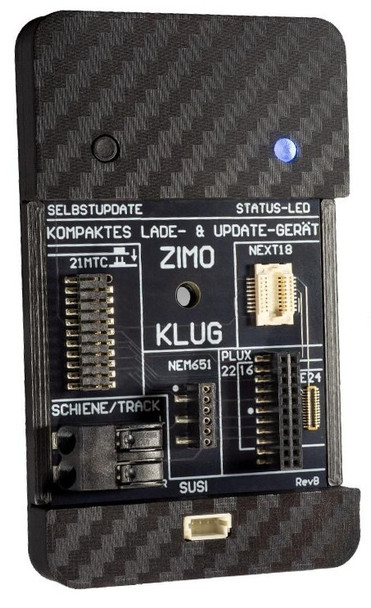
The ZIMO KLUG is the new compact charging and update device for ZIMO decoders. It is versatile, handy, and inexpensive – however, it lacks a display and requires a connection to a computer (Windows) and a decoder charging and update program (su).
A decoder can either be plugged directly into the ZIMO KLUG or – remaining in the vehicle without opening it – connected via the track. The MSTAPK and MSTAPG boards can also be used for connection. The first software version supported all currently produced
ZIMO decoders of the MS (sound), MN (no sound), and FS (function sound) series; since KLUG software version 0.3.6 , types of the MX series have also been supported (IMPORTANT: only from ZPP version 1.26.00 onwards).
PERFORMANCE OVERVIEW
- Software update
- via PCs and ZIMO ZSP or ZPP configuration (as with the following).
- Loading sound projects
- optionally via rail or SUSI interface (particularly fast, < 5 min).
- Simultaneous sound loading and updating of multiple decoders
- via multiple MSTAP boards or MultiTAP
- Testing decoders
- in the MSTAP test and connection boards or in the model,
- 10 V driving operation and switching of functions (max. 400 mA) with virtual control panel
- in ZSP and ZPP configuration, e.g. after software update or sound loading.
- CV programming and CV reading
- Self-update of the KLUG
Note : SUSI cable included. Data-enabled USB-C cable available as an accessory (part code USBCKAB).
TECHNICAL DATA
- Interfaces for direct decoder insertion:
- Maximum current output at the "rail" output (stabilized at V out = 10 V)400 mA
- Dimensions L x W x H 68 x 41 x 7.5 mm
- Power supply via USB-C input5 V, min. 900 mA
Note : A USB port capable of delivering at least 900 mA is required for power supply. This is always guaranteed with USB-A 3.0 and USB-C ports. Operation with older USB ports is possible in principle, but not recommended.
CONNECTIONS
For power supply, the KLUG is connected to a Windows PC via a USB-C data cable ⇒ status LED lights up blue.
A decoder can be connected to the ZIMO KLUG in several ways. Only one decoder may be directly connected to the KLUG at any given time. Connecting or replacing a decoder is possible when the LED is lit blue or when the KLUG is disconnected from the USB port.
- Directly at the ZIMO KLUG
- The standardized interfaces PluX16/22, 21MTC, Next18, E24, and NEM651 can be used directly for the corresponding decoders. This automatically connects the decoder's SUSI pins (except for NEM651), which are used for (fast) loading of sound projects.
- On test and connection board MSTAPK2 or MSTAPG
- Wired decoders, NEM652 decoders and large-scale decoders can be connected via a test and connection board MSTAPK ("K" = small) or MSTAPG ("G" = large-scale); these boards also allow the testing of decoders (all types, including non-ZIMO) by means of a kind of simulated locomotive (motor, speaker, LEDs, etc.).
- At the RAIL output of the ZIMO KLUG (decoder in the vehicle)
- The decoder is updated with a software update or a new sound project while the vehicle is still inside (without opening the vehicle). For this, the ZIMO KLUG's RAIL output is connected to a single piece of track, the so-called "update track."
- Transferring a sound project via the track connection takes significantly longer than via SUSI; approximately ten times longer.
- Large-scale model railway decoder: via SUSI cable directly to the ZIMO KLUG
- Large-scale model railway decoders like the MS950 or MS990 can be directly connected to the ZIMO KLUG using a SUSI cable.
- With large-scale decoders like the MS950, it may be necessary to wait a few seconds (to charge the built-in energy storage) before starting the update or sound loading process.
SOFTWARE UPDATE and SOUND LOADING
Three programs are available for decoder software updates and sound loading.
"ZPP Konfig" is the program ZIMO recommends for the KLUG, but the alternatives also have their advantages:
- The program “ZPP Konfig”
- provides convenient control of all measures related to ZIMO KLUG: self-update, loading sound projects into the decoder via the track (i.e., leaving the decoder in the vehicle) or via SUSI (plugging the decoder into one of the existing interfaces or – rarely – connecting it via SUSI cable), decoder software update via the track (decoder in the vehicle), CV programming/reading, and test operation via virtual control panel on the track or together with the MSTAP board.
- The program “ZSP”
- The ZIMO Sound Programmer, ZSP, contains all the above-mentioned possibilities; however, ZSP is primarily specialized in the creation of sound projects.
- The program "ZCS"
- is a very popular program among many model railroaders, developed by Matthias Manhart (not by ZIMO itself), and offers a much wider range of functions than just decoder loading and updating. This primarily includes graphically supported CV programming ("ZCS" is an acronym for "ZIMO CV Setting"), but also the creation of GUIs (Graphical User Interfaces) for ZIMO system products (control panels and apps).
DOWNLOADS & LINKS
ZPP Config was previously, and still is, installed together with the ZSP program. Therefore, the latest version can be found on the ZSP website.
- ZSP ZIMO Sound Programmer + ZPP Config
- User manual for both programs including instructions for creating ZIMO ZSP sound files.
Further information about the ZSP program can be found on the ZIMO website ZIMO CV Setting , as well as on Matthias Manhart's website, where the latest version of the program is also located.
OPERATION & OPERATING MODES
The ZIMO KLUG operating instructions contain detailed information and instructions on
- Connect the USB-C cable and decoder
- Preparation of the program “ZPP Config”
- Self-update of the KLUG
- Decoder software update and sound loading
- CV programming and test operation
- Read/program decoder ID number/loading code
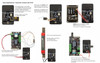
- Typical applications with KLUG
SOFTWARE UPDATE FOR THE KLUG
Short guide for self-updating the KLUG:
ATTENTION: Self-updating the KLUG is only possible via a PC using the ZPP Konfig (or ZSP) application.
- Use the online update function of ZPP Konfig OR download the new KLUG software as a zip file from below on this webpage; unzip the file.
- Prepare the KLUG:
- Disconnect the USB cable from the KLUG.
- Press and hold the self-update button on the KLUG.
- Connect the USB-C data cable from the PC to the KLUG, release the button after about 1 second.
- KLUG is now in update mode (bootloader)
- Status LED is NOT lit!
- The update is performed in the ZPP Konfig software via the menu item: KLUG Update
- In the Firmware field:
- click on Online Update -> ZPP Konfig automatically loads the current firmware OR
- click on File to select a previously downloaded KLUG update file using the file browser.
- In the Firmware field:
- Start the process by clicking the Start update button.
- Once the update is complete, you can close the window by clicking Close or X.
- A blue status LED indicates that the KLUG is ready for use.
- If not: Disconnect the USB cable from the KLUG and reconnect it.
Note: Regular updating of the KLUG software is advisable or even necessary, especially when new decoder types or generations are introduced. As it is not possible to provide complete documentation of the compatibility between decoder and software versions, it is recommended that you update the KLUG yourself at the latest when problems arise.
Refer to the KLUG Operating Instructions Manual for a full description of capabilities and operating instructions.
Presentation Video
Tutorial Video
Additional Resources
MANUFACTURERS WEBSITE: |
|
SOUND CONFIGURATION & SOUND FILE RESOURCES: |
|
FIRMWARE & SOFTWARE RESOURCES: |
|
PRODUCT MANUALS & TECHNICAL DOCUMENT RESOURCES: |
|
MANUFACTURERS WARRANTY & REPAIRS: |
|
ADDITIONAL INFORMATION - DCC TIPS: |
|
ADDITIONAL INFORMATION (1): |
|
ADDITIONAL INFORMATION (2): |
Additional Information
PRODUCT CLASS : |
All Scales |
SIZE-INCH (L x W x H): |
2.68 x 1.62 x 0.30 in |
SIZE-METRIC (L x W x H): |
68 x 41 x 7.5 mm |
ADDITIONAL FEATURES: |
NA |
NOTES (1): |
NA |
NOTES (2): |
NA |
Related Products


ZIMO MXULFA Decoder Update Module with LCD Display
ZIMO DCC

SBS4DCC Sound Decoder Reprogramming - ZIMO
SBS4DCC - Streamlined Backshop

SBS4DCC ZIMO OEM Decoder Warranty
SBS4DCC - Streamlined Backshop

ZIMO 22AWG Decoder Wire - 7m - Violet
ZIMO DCC
ZIMO MN150 Nano DCC Decoder - Hardwire
ZIMO DCC